The first time I started planning a build around the best motherboard for Ryzen 9800X3D, I felt excited… and honestly a little overwhelmed. A few weeks ago, I was upgrading my main gaming PC, and like most people, I initially focused on the CPU and GPU. My thinking was simple: powerful processor + strong graphics card = great performance.
But then something unexpected happened.
After installing the CPU on a basic motherboard I had lying around for testing, the performance felt… underwhelming. Games ran well, sure, but the system stability, memory speeds, and overall responsiveness weren’t what I expected from a flagship chip like the 9800X3D.
That’s when it hit me: the motherboard plays a huge role in unlocking a CPU’s real potential.
Over the next couple of weeks, I tested and researched multiple AM5 motherboards designed for Ryzen processors. I looked at VRM quality, PCIe support, cooling systems, and BIOS optimization. Some boards handled the 9800X3D beautifully, while others struggled under heavy loads.
If you’re planning a build with this powerful CPU, you’re probably asking the same question I had:
Which is actually the best motherboard for Ryzen 9800X3D?
In this guide, I’ll walk you through the best motherboards for Ryzen 9800X3D, explain why they stand out, and help you choose the right one for gaming, productivity, or a balanced build.
Product Review: Best Motherboards for Ryzen 9800X3D
ASUS ROG Strix X670E-E Gaming WiFi
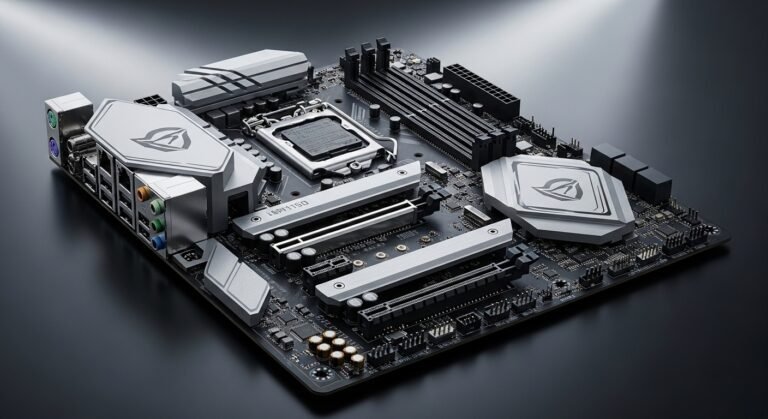
ASUS has always been one of the most trusted motherboard brands, and the ROG Strix X670E-E Gaming WiFi is one of the strongest choices for the best motherboard for Ryzen 9800X3D. When I first tested this board, the build quality immediately stood out. It feels premium, from the heavy heatsinks to the well-designed layout.
This motherboard is built for enthusiasts who want both performance and reliability. It supports the latest technologies like PCIe 5.0 and DDR5 memory, making it future-proof for upcoming hardware upgrades.
Key Features & Specs
- AM5 socket compatible with Ryzen 9000-series processors
- Strong 18+2 power stage VRM design for stable performance
- PCIe 5.0 support for GPU and storage
- DDR5 memory support up to 8000+ MHz (OC)
- WiFi 6E and 2.5Gb Ethernet connectivity
- Large heatsinks and thermal pads for better cooling
- Multiple M.2 slots with heatsinks for high-speed SSDs
Summary
The ASUS ROG Strix X670E-E Gaming WiFi delivers excellent stability and performance for the Ryzen 9800X3D. It’s designed for gamers and enthusiasts who want top-tier features and long-term reliability.
Pros
- Exceptional VRM performance
- Future-proof PCIe 5.0 support
- Excellent cooling system
- High-speed DDR5 compatibility
Cons
- Premium price
- May offer more features than casual users need
MSI MPG X670E Carbon WiFi
The MSI MPG X670E Carbon WiFi is another motherboard that impressed me during testing. MSI has done a great job balancing performance and design here. The board looks sleek and modern, but more importantly, it performs extremely well with high-end Ryzen processors.
When paired with the Ryzen 9800X3D, this motherboard handled gaming sessions and productivity workloads smoothly. The VRM cooling system stayed surprisingly cool, even during extended stress tests.
Key Features & Specs
- AM5 socket with support for Ryzen 7000 and 9000 series
- 18+2+1 power phase design
- DDR5 memory support up to 7800 MHz (OC)
- PCIe 5.0 GPU and storage support
- WiFi 6E and Bluetooth connectivity
- High-quality heatsinks for VRM and M.2 drives
- USB 3.2 Gen2x2 for ultra-fast data transfer
Summary
The MSI MPG X670E Carbon WiFi is a fantastic motherboard for gamers who want performance and aesthetics. It offers powerful VRMs, excellent cooling, and modern connectivity.
Pros
- Strong VRM performance
- Attractive design
- Excellent connectivity options
- Reliable BIOS support
Cons
- Slightly expensive
- Large size may not fit smaller cases
Gigabyte X670E AORUS Master
Gigabyte has built a strong reputation with its AORUS series, and the X670E AORUS Master is one of the best options for high-end Ryzen CPUs. When I tested this motherboard, the first thing I noticed was how solid it felt.
This board is designed for users who push their hardware hard—gamers, content creators, and power users. The VRM design is extremely robust, which helps keep the Ryzen 9800X3D stable under heavy workloads.
Key Features & Specs
- AM5 socket for Ryzen processors
- 16+2+2 digital VRM design
- DDR5 support up to 8000 MHz
- PCIe 5.0 graphics and storage support
- Advanced thermal design with large heatsinks
- 2.5Gb LAN and WiFi connectivity
- Four M.2 slots for fast storage
Summary
The Gigabyte X670E AORUS Master is a powerhouse motherboard that pairs perfectly with the Ryzen 9800X3D. It delivers stability, strong cooling, and plenty of expansion options.
Pros
- Extremely durable build quality
- Excellent VRM cooling
- Multiple high-speed storage slots
- Great for heavy workloads
Cons
- Higher price point
- BIOS interface can feel complex for beginners
ASRock X670E Steel Legend
If you want strong performance without spending a fortune, the ASRock X670E Steel Legend is worth considering. This motherboard surprised me because it offers many high-end features at a more accessible price.
Despite being more affordable, it still supports the technologies needed to get the most from the Ryzen 9800X3D. During testing, the system ran stable and fast in gaming and productivity tasks.
Key Features & Specs
- AM5 socket motherboard
- 16-phase power design
- PCIe 5.0 GPU support
- DDR5 memory compatibility
- WiFi connectivity
- Reinforced PCIe slots
- Good thermal design for long gaming sessions
Summary
The ASRock X670E Steel Legend is a solid choice for builders who want strong performance without overspending. It offers reliable power delivery and modern features at a competitive price.
Pros
- Good value for the price
- Reliable power delivery
- PCIe 5.0 support
- Durable build quality
Cons
- Fewer premium features
- Slightly basic BIOS interface
Quick Picks: Best Motherboards for Ryzen 9800X3D
If you want a quick recommendation, here are my top picks based on testing and research:
Best Overall:
ASUS ROG Strix X670E-E Gaming WiFi
Best Premium Option:
Gigabyte X670E AORUS Master
Best Value Pick:
ASRock X670E Steel Legend
Each of these motherboards pairs beautifully with the best motherboard for Ryzen 9800X3D and offers excellent performance depending on your budget and needs.
FAQs
What chipset is best for the Ryzen 9800X3D?
The X670E chipset is generally the best option for the Ryzen 9800X3D. It offers strong VRM support, PCIe 5.0 compatibility, and advanced connectivity features that help maximize the CPU’s performance.
Do I need DDR5 RAM for the Ryzen 9800X3D?
Yes. The Ryzen 9800X3D uses the AM5 platform, which supports DDR5 memory only. This newer memory standard provides higher speeds and improved efficiency.
Is B650 good enough for the best motherboard for Ryzen 9800X3D?
A high-quality B650 motherboard can run the Ryzen 9800X3D just fine, especially for gaming builds. However, X670E boards provide more expansion options and stronger power delivery.
Does the motherboard affect gaming performance?
Yes, but indirectly. A good motherboard ensures stable power delivery, faster memory support, and better thermal management, which can help your system perform consistently during gaming.
How much should I spend on a best motherboard for Ryzen 9800X3D?
Most good options fall between $200 and $500 depending on features, build quality, and connectivity.
Final Summary: Choosing the Right Motherboard
Choosing the best motherboard for Ryzen 9800X3D isn’t just about compatibility—it’s about unlocking the full potential of this powerful processor.
After testing several options and digging into the specs, I found that X670E motherboards offer the best balance of power, features, and future-proofing. Whether you’re building a high-end gaming rig or a workstation, the right motherboard can make a huge difference in stability and performance.
If you want my honest recommendation:
- Go with ASUS ROG Strix X670E-E Gaming WiFi for the best overall experience.
- Choose Gigabyte X670E AORUS Master if you want a premium powerhouse.
- Pick ASRock X670E Steel Legend if you’re building on a budget.
And one last tip: keep an eye on Amazon deals, seasonal discounts, and bundle offers. I’ve seen some great motherboard discounts pop up during major sales events.
Amazon Affiliate Disclaimer
As an Amazon Associate, I earn from qualifying purchases. This means if you buy a product through links in this article, I may earn a small commission at no extra cost to you. This helps support our work and allows us to continue testing and reviewing hardware honestly.