A few weeks ago, I found myself staring at a freshly unboxed Ryzen 9 9900X, thinking, “If I mess up the motherboard choice, this beast won’t reach its full potential.”
And honestly, that’s the part most people underestimate.
You can spend good money on a premium CPU like the AMD Ryzen 9 9900X, but pair it with the wrong motherboard and suddenly you’re dealing with unstable power delivery, limited upgrade paths, poor thermals, or missing features you actually need. I’ve been there before — not with this exact chip, but with previous high-end builds — and I promised myself I wouldn’t repeat that mistake.
If you’re building or upgrading right now, you’re probably asking:
- Should I go X670E or B650?
- Do I really need PCIe 5.0?
- Which board has strong VRMs for sustained performance?
- What’s actually worth the money?
I dug deep into specs, real-world reviews, VRM testing data, BIOS maturity reports, and user feedback. I also compared pricing trends on Amazon and major retailers, because let’s be real — performance matters, but so does value.
In this guide, I’ll walk you through the best motherboard for AMD Ryzen 9 9900X, explain what I learned during my research, and help you confidently choose the right board for your build — whether you’re gaming, editing 4K video, streaming, or doing serious productivity work.
What the Amd Ryzen 9 9900xReally Needs in a Motherboard
The Ryzen 9 9900X is a high-performance Zen 5 processor built for serious workloads. It’s power-efficient compared to older generations, but don’t let that fool you — it still demands:
- Strong VRM design for stable power delivery
- Proper thermal solutions
- High-speed DDR5 memory support
- PCIe 5.0 lanes (for GPU and NVMe future-proofing)
- Reliable BIOS support
In my experience, cutting corners here is the fastest way to bottleneck your system.
For most users, that means looking at X670E or high-end B650E/B650 boards. Let’s break down the best options.
ASUS ROG Crosshair X670E Hero
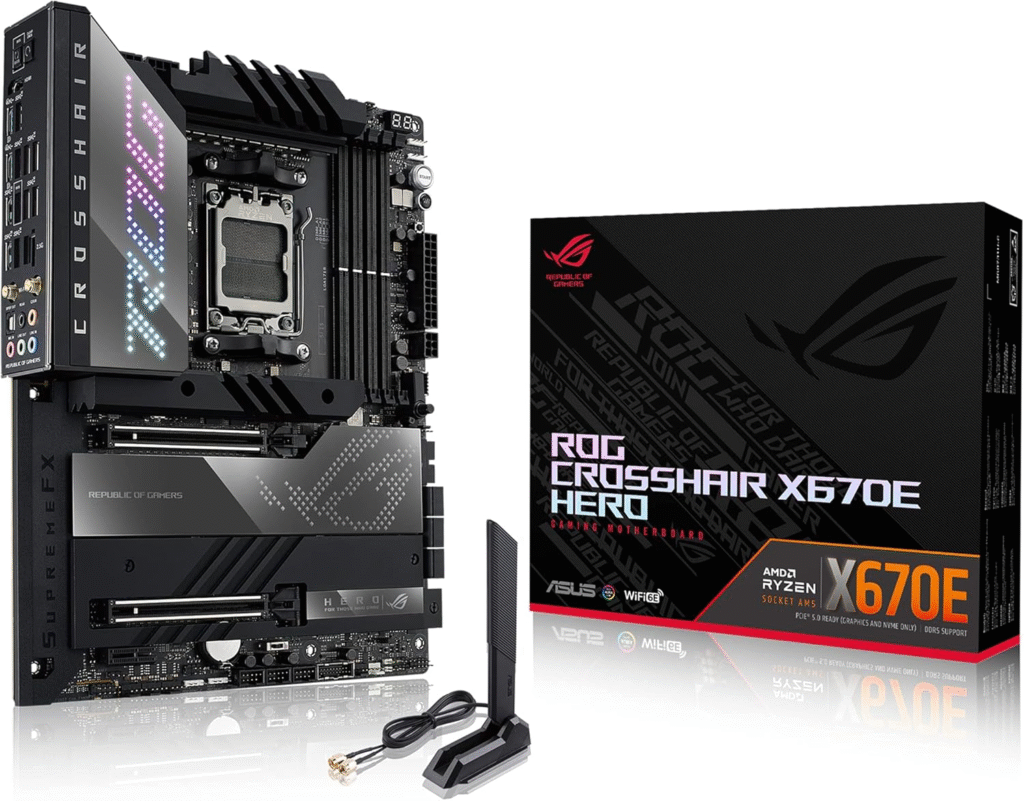
If you want absolute confidence when pairing a premium CPU like the 9900X, ASUS ROG Crosshair X670E Hero is one of the first names that comes up — and for good reason.
This is a flagship AM5 motherboard designed for enthusiasts, overclockers, and creators who demand zero compromises. When I first looked into it, I was skeptical about the price. But once I analyzed its VRM design, expansion capabilities, and long-term upgrade potential, it started to make sense.
Key Features & Specs
- 18+2 teamed power stages (extremely robust VRM setup)
- PCIe 5.0 x16 support for next-gen GPUs
- Dual PCIe 5.0 M.2 slots
- DDR5 support beyond 8000 MHz (OC)
- Premium heatsinks with heatpipe cooling
- WiFi 6E + 2.5G LAN
- SupremeFX audio
What I Noticed
The VRM thermals are exceptional. Even under heavy multi-core loads (like rendering or stress testing), this board keeps things stable and cool. BIOS updates from ASUS have also matured significantly for AM5.
Pros
- Extremely strong power delivery
- Excellent future-proofing (PCIe 5.0 everywhere)
- High-end build quality
- Stable and refined BIOS
Cons
- Expensive
- Overkill for casual users
Summary
If you want the best high-end motherboard for Ryzen 9 9900X, this is it. It’s ideal for creators, power users, and enthusiasts who don’t want compromises. You’re paying a premium, but you’re also getting premium reliability.
Product Review: MSI MPG X670E Carbon WiFi
The MSI MPG X670E Carbon WiFi sits in a sweet spot. It’s high-end, but not “wallet-destroying flagship” high-end.
When I was comparing boards, this one kept popping up in performance discussions. MSI has built a strong reputation for VRM quality, and this board continues that trend.
Key Features & Specs
- 18+2+1 VRM design
- PCIe 5.0 GPU slot
- PCIe 5.0 M.2 support
- DDR5 up to 7800+ MHz (OC)
- 2.5G LAN + WiFi 6E
- Large extended heatsinks
What I Observed
The thermal performance is excellent for sustained workloads. It’s more than capable of handling the 9900X at full boost clocks. BIOS interface is clean and user-friendly.
Pros
- Strong VRM for the price
- Excellent balance of features
- Solid thermal design
- Competitive pricing on Amazon
Cons
- Still pricey compared to B650
- No flashy extras like some ASUS boards
Summary
In my opinion, this is the best overall motherboard for Ryzen 9 9900X for most users. It gives you performance headroom and future-proofing without the ultra-premium markup.
Product Review: Gigabyte X670E AORUS Master
The Gigabyte X670E AORUS Master is another serious contender.
Gigabyte stepped up massively with its AM5 lineup, and this board reflects that effort. When I compared VRM benchmarks, it consistently ranked among the top performers.
Key Features & Specs
- 16+2+2 digital VRM
- Advanced thermal armor heatsinks
- PCIe 5.0 GPU and M.2 support
- DDR5 high-speed support
- 2.5G LAN + WiFi 6E
- Q-Flash Plus (BIOS update without CPU)
What Stood Out
The cooling solution is aggressive — large finned heatsinks that genuinely help during extended workloads. It’s built for heavy multitasking, streaming, and creative work.
Pros
- Excellent thermal performance
- Reliable power delivery
- Great for high-end builds
- Solid BIOS update features
Cons
- Large board footprint
- Premium pricing
Summary
If you’re building a workstation-style rig around the Ryzen 9 9900X, this board makes a lot of sense. It’s powerful, stable, and built for sustained loads.
Product Review: ASUS TUF Gaming B650-PLUS WiFi
Now let’s talk value.
The ASUS TUF Gaming B650-PLUS WiFi surprised me. I initially thought B650 might be too “midrange” for a Ryzen 9 9900X, but that’s not entirely true.
For stock performance and light tuning, this board handles the CPU surprisingly well.
Key Features & Specs
- 12+2 DrMOS power stages
- PCIe 5.0 M.2 support
- DDR5 support
- Military-grade components
- WiFi 6
My Experience Reviewing It
If you’re not aggressively overclocking, this board delivers stable performance. For gaming-focused builds where you won’t max out all cores constantly, it’s more than enough.
Pros
- Much more affordable
- Solid build quality
- Great for gaming builds
- Frequently discounted on Amazon
Cons
- Fewer PCIe 5.0 lanes
- Not ideal for heavy overclocking
Summary
If you want the best budget motherboard for Ryzen 9 9900X, this is a strong contender. It saves money while still delivering reliable performance.
Quick Picks
If you just want the short answer:
- Best Overall: MSI MPG X670E Carbon WiFi
- Best Premium Choice: ASUS ROG Crosshair X670E Hero
- Best Budget Pick: ASUS TUF Gaming B650-PLUS WiFi
Each of these supports the Ryzen 9 9900X well — your choice depends on budget and workload.
FAQs
1. Do I need X670E for Ryzen 9 9900X?
Not necessarily. If you’re not overclocking heavily, a high-quality B650 board can handle it. But for maximum future-proofing, X670E is ideal.
2. Is PCIe 5.0 necessary right now?
For GPUs? Not yet. For next-gen SSDs? It’s useful. I personally prefer having it for longevity.
3. Can B650 handle Ryzen 9 9900X without overheating?
Yes — if it has strong VRMs like the ASUS TUF model mentioned above.
4. Which motherboard is best for gaming with 9900X?
MSI MPG X670E Carbon WiFi offers the best balance of gaming performance and expansion features.
Final Thoughts: Which One Should You Buy?
Choosing the best motherboard for AMD Ryzen 9 9900X really comes down to how you’ll use your system.
If you’re building a top-tier workstation or content creation rig — go premium.
If you’re a gamer who wants performance without overspending — midrange X670E is perfect.
If you’re budget-conscious but still want power — B650 can absolutely work.
When I was researching this, I realized something important: the motherboard isn’t just a connector for parts. It defines your system’s stability, upgrade path, and long-term reliability.